 Levende
How to animate a drawing and make it dance
You don’t have to draw it again frame by frame. Take a photo of the drawing, cut the figure out of the paper, put a skeleton in it (head, shoulders, elbows, hands, hips, knees and feet) and move the skeleton: the drawing bends along with it. An app does all four steps for you. On iPhone or iPad, Levende does them on the device; Meta’s free Animated Drawings demo does them in the browser.
Step by step on iPhone or iPad
- Install Levende from the App Store (it’s free) and tap Scan a drawing. Hold the phone straight above the drawing in good light, with the whole sheet in the picture. You can also tap Pick a picture to use a photo you already have.
- The figure is cut out of the paper automatically. If an arm is missing, paint it back with Add, and remove anything extra with Erase.
- Levende finds the head, hands and feet and gives the figure a skeleton. If a dot is in the wrong place, drag it to where it belongs; the rest follows.
- On the stage, pick a move: wave, walk, jump, dance, jumping jacks, cheer, spin, kick, clap or zombie. Tap the floor, and the figure walks there.
- Tap Record to make a video of up to 30 seconds with sound, or switch to AR to put the figure on your kitchen table.
Everything happens on your iPhone or iPad, with no account, and nothing is uploaded.
Draw it so it can dance
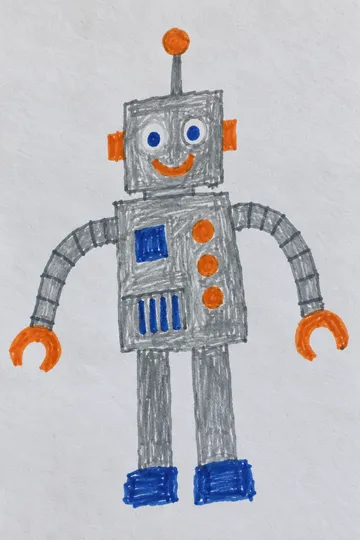
- Clear lines, coloured in. A dark, closed outline on plain white paper is easy to cut out. Thin, faint pencil lines are not.
- Arms and legs clear of the body. Where an arm touches the body, or one leg touches the other, they move together. Leave a small gap, or separate them with Erase afterwards.
- The whole figure on the sheet, with a little space to the edge, and one figure per drawing.
- Even light, without your own shadow across the paper.
- No arms, or only one leg? That’s fine. Leave the missing limb’s dots together at the shoulder or hip, and the rest still moves.
Meta’s Animated Drawings gives the same advice, so these tips work whichever tool you use.
Other ways to animate a drawing
- In the browser: Meta’s free Animated Drawings demo does the same steps on Meta’s servers and has 27 motions. The drawing is uploaded, and its terms don’t allow users under 18.
- By hand, frame by frame: draw the figure again in slightly different poses and show the drawings quickly one after another, like a flip book. Even a few seconds of movement takes dozens of drawings. It takes much longer, but every movement is your own.